Ad reads
A presenter delivers your offer in 15 or 30 seconds, straight to camera.
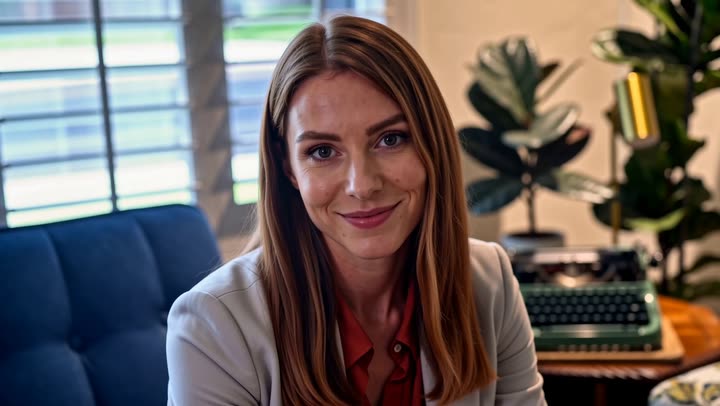
A presenter on camera, reading your words. Pick a presenter, pick a voice, paste your script — AI Presenter delivers it straight to camera for ads, explainers and announcements.
Previews from the AI Presenter library.
A presenter delivers your offer in 15 or 30 seconds, straight to camera.
What it is, who it is for, how it works — in a minute.
Launches, drops and updates without booking a shoot.
Friendly welcome and how-to videos for customers or staff.
A recurring host for your channel’s series.
Hear three versions of the pitch before you hire talent.
Choose a 15, 30 or 60 second slot; you are charged only for the seconds actually spoken.
Search the voice library by language and filter by voice, then pair it with any presenter.
Seedance, Kling, Veo, MiniMax, Nano Banana Pro and GPT Image 2 all draw from the same monthly credits as your clips. No stack of subscriptions.
The same account clips your long videos and streams, so AI shots, hooks and highlights live side by side.
Tap one to drop it into the generator above, then make it yours.
Choose from the presenter library, then a voice by language and type.
Up to 1,200 characters — about 2.5 words a second when spoken.
Your presenter says it on camera. Download and post.
A spokesperson script is heard, not read. Short sentences, one idea per sentence, and words you would actually say out loud. Contractions help (“it’s”, “you’ll”). Numbers should be written the way they are spoken. Read the script aloud once before you generate it — if you stumble, the presenter will sound like they are reading.
Presenters speak at roughly 2.5 words per second. That makes a 15-second slot about 35 words, a 30-second slot about 75 and a 60-second slot about 150. Pick the slot that fits the script; you are charged only for the seconds actually spoken, so a 24-second read in a 30-second slot costs 24 seconds. Scripts can be up to 1,200 characters.
For ads, front-load the hook: the first sentence decides whether anyone hears the second. A reliable shape is hook → problem → product → proof → call to action. For explainers, say what the viewer will learn, then number the steps out loud. End every video with one clear next step.
Match the presenter to the audience and the setting to the message: a relaxed home-office look for software, a bright studio for retail. The voice library is searchable and labelled by language and voice type, so you can pair the same presenter with different voices for different markets.
AI Presenter lives inside Marketing in the AI Creator. Be transparent with viewers that the presenter is AI where your platform or market expects it, and never script a presenter to impersonate a real person.
Because a presenter video costs only the seconds spoken, it is a cheap way to hear three versions of a pitch side by side. Generate a short, a medium and a long read, show them to a few customers, and keep the one that lands — then decide whether it deserves a full production.
A Marketing recipe in the AI Creator: pick a presenter and a voice, write your script, and they say it on camera.
Choose a 15, 30 or 60 second slot. Scripts can be up to 1,200 characters, about 2.5 words per second when spoken.
Only for the seconds actually spoken, up to the slot you chose, from your credits wallet.
Yes. Voices come from a searchable library labelled by language and voice type, with female and male filters.
Not in AI Presenter today — it uses presenters from the library. To put a character of your own into a video, see Morphaze.
Everything runs on one monthly credits wallet that you also use for clipping: Starter is $19 for 300 credits, Pro $39 for 600 and Ultra $59 for 1,000. A presenter video draws a set number of credits per spoken second, shown before you generate. The generator shows the credits before you confirm, and credits reset each billing cycle. See pricing for the full table.
New accounts can start with a $1 3-day trial: 30 minutes of clipping on any plan, watermark-free, plus your own AI Influencer. AI Video, AI Images, Morphaze and AI Ads unlock when your plan starts — or skip the trial in the app to unlock them now.
You do. Our Terms say you keep full ownership of anything you upload or generate, and you are responsible for how you use it — including having the rights to any photo or clip you upload. Platforms increasingly ask you to label realistic AI video; our disclosure guide covers YouTube, TikTok and Meta.
 AI Video Generator
 AI Image Generator
 AI Influencer Generator
 Morphaze AI Character Swap
 AI Motion Transfer
 AI Dance Video Generator
 AI Ad Generator
 AI UGC Video Generator
 AI Product Photo Generator
 Image to Video
 Text to Video
 AI Spokesperson Video
 Faceless Video Generator
 AI Storyboard Generator
Plans from $19 a month for 300 credits, shared across every AI model and your clips. Pro is $39 for 600, Ultra $59 for 1,000. Cancel anytime.
 Seedance 2.5
 Nano Banana Pro
 Kling 3.0
 Veo 3.1
 AI Clip Maker