Story and history
Visuals for narrated stories, mysteries and history explainers.
Run a channel without ever being on camera. Generate the visuals your voiceover needs — sweeping aerials, hands at work, cities at night — or give the channel an AI character as its face.
Visuals generated for voiceover-led shorts.
Visuals for narrated stories, mysteries and history explainers.
Nature, rain and city loops for sleep, study and focus content.
One striking shot per fact for “5 things you didn’t know” shorts.
Cooking, crafts and DIY seen from above, no face required.
Sunrises, summits and city timelapses under a voiceover.
A recurring AI character as the channel’s face, via AI Influencer and Morphaze.
Every video model renders 9:16 for TikTok, Reels and Shorts, and 16:9 for YouTube and ads.
Seedance, Kling, Veo, MiniMax, Nano Banana Pro and GPT Image 2 all draw from the same monthly credits as your clips. No stack of subscriptions.
Design an AI influencer once as a character sheet, then put the same face into Morphaze videos and ads.
The same account clips your long videos and streams, so AI shots, hooks and highlights live side by side.
Tap one to drop it into the generator above, then make it yours.
One visual per line of voiceover.
Vertical 9:16, 4–8 seconds each, from any model.
Lay the shots under your voiceover in your editor and post.
A faceless channel trades a host for two things: a strong voice and relentless visuals. The script carries the story; the pictures keep thumbs from scrolling. For years, those pictures came from stock libraries — the same overused drone shots everyone else had. Generating them changes the maths: every line of the script can have a shot made for it.
The simplest workflow is a two-column script. On the left, the voiceover line. On the right, the shot that illustrates it, written as a prompt. Generate the right-hand column in 9:16, four to eight seconds each, then lay them under the voice in your editor. Seedance Fast is the workhorse for volume; Seedance 2.5 and Kling 3.0 are worth it for the hero shots in the first three seconds.
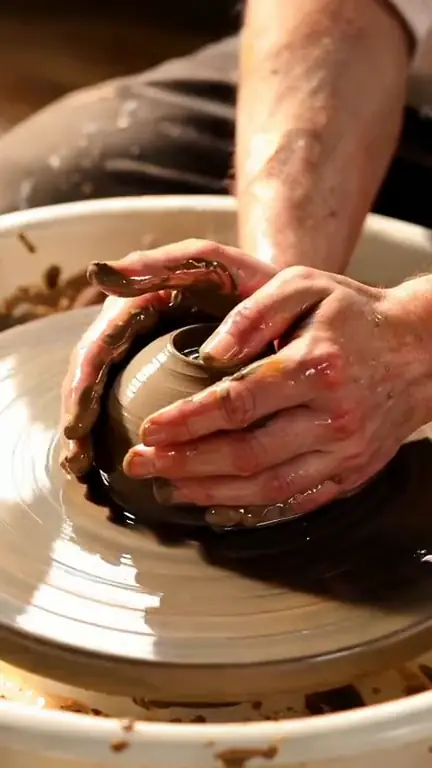
Generated B-roll looks generic when prompts are generic. Be specific about texture and point of view: “macro of wet clay rising between two hands” beats “pottery”. Choose a consistent palette and light across a video so the shots feel like one film. Keep people anonymous — hands, silhouettes, backs — and the channel stays truly faceless.
Some of the fastest-growing “faceless” channels actually have a face — just not a human one. Design a recurring character in the AI Influencer generator, then put it into trends with Morphaze. And if you already have long videos or streams, the same account’s AI clip maker cuts them into shorts.
Narrated voiceover is something you record or produce separately; ClipSpeed generates the visuals.
Consistency matters more than any single video. A workable cadence is to write five scripts at once, list the shots for all of them, and generate the visuals in one session, so every short in the week shares a palette and a style. Credits are monthly, so planning a batch also makes it easy to see what a week of content costs before you start.
A tool that generates the visuals for videos where no host appears on camera — B-roll, scenery, hands-only shots or an AI character.
No. ClipSpeed generates the visuals; record or produce your voiceover separately and cut the shots under it.
9:16 for Shorts, TikTok and Reels. Every video model renders vertical.
Four to eight seconds per shot keeps a short moving. Seedance Fast goes up to 12 seconds, Seedance 2.5 up to 30.
Yes. Build one with the AI Influencer generator and put it into videos with Morphaze.
Everything runs on one monthly credits wallet that you also use for clipping: Starter is $19 for 300 credits, Pro $39 for 600 and Ultra $59 for 1,000. A 5-second Seedance Fast shot at 720p is about 5 credits, so a 10-shot short is roughly 50. The generator shows the credits before you confirm, and credits reset each billing cycle. See pricing for the full table.
New accounts can start with a $1 3-day trial: 30 minutes of clipping on any plan, watermark-free, plus your own AI Influencer. AI Video, AI Images, Morphaze and AI Ads unlock when your plan starts — or skip the trial in the app to unlock them now.
You do. Our Terms say you keep full ownership of anything you upload or generate, and you are responsible for how you use it — including having the rights to any photo or clip you upload. Platforms increasingly ask you to label realistic AI video; our disclosure guide covers YouTube, TikTok and Meta.
 AI Video Generator
 AI Image Generator
 AI Influencer Generator
 Morphaze AI Character Swap
 AI Motion Transfer
 AI Dance Video Generator
 AI Ad Generator
 AI UGC Video Generator
 AI Product Photo Generator
 Image to Video
 Text to Video
 AI Spokesperson Video
 Faceless Video Generator
 AI Storyboard Generator
Plans from $19 a month for 300 credits, shared across every AI model and your clips. Pro is $39 for 600, Ultra $59 for 1,000. Cancel anytime.
 Seedance 2.5
 Nano Banana Pro
 Kling 3.0
 Veo 3.1
 AI Clip Maker