Ads and commercials
A 15 or 30 second spot, shot by shot, before any money is spent.
Turn a shot list into a board in one generation — six cinematic frames, the same character in each — then animate any frame into a real video shot.
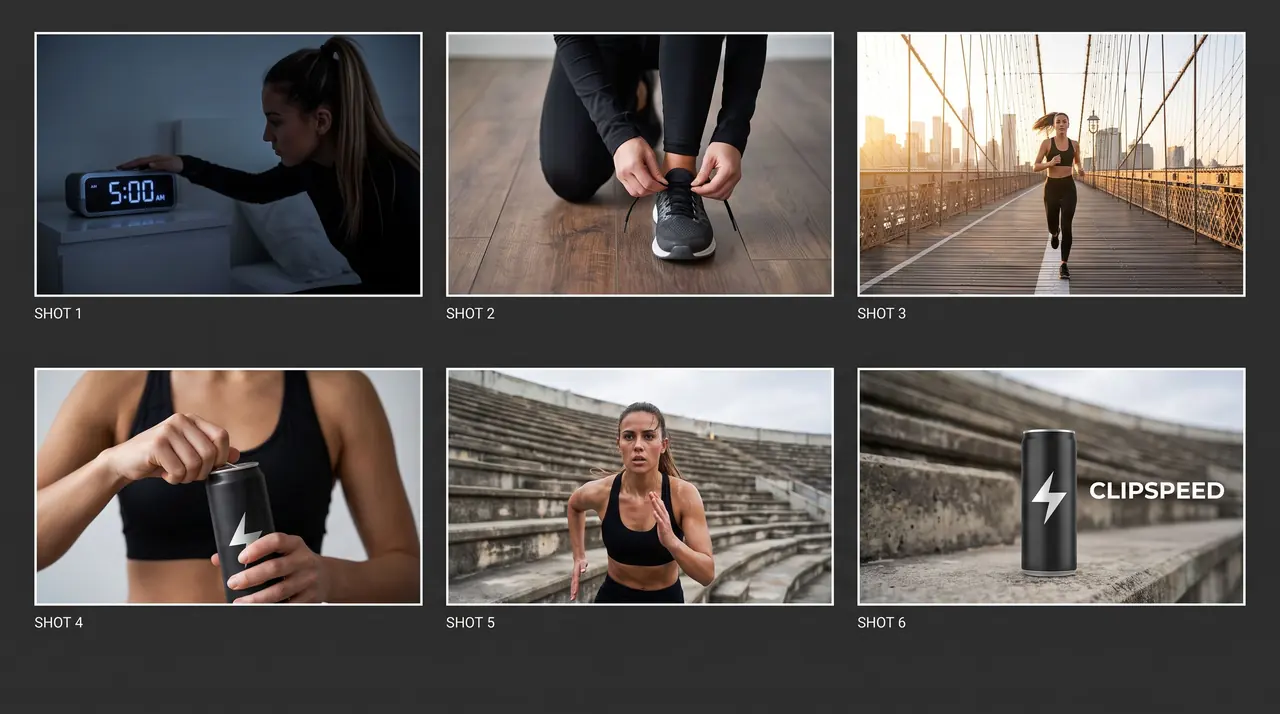
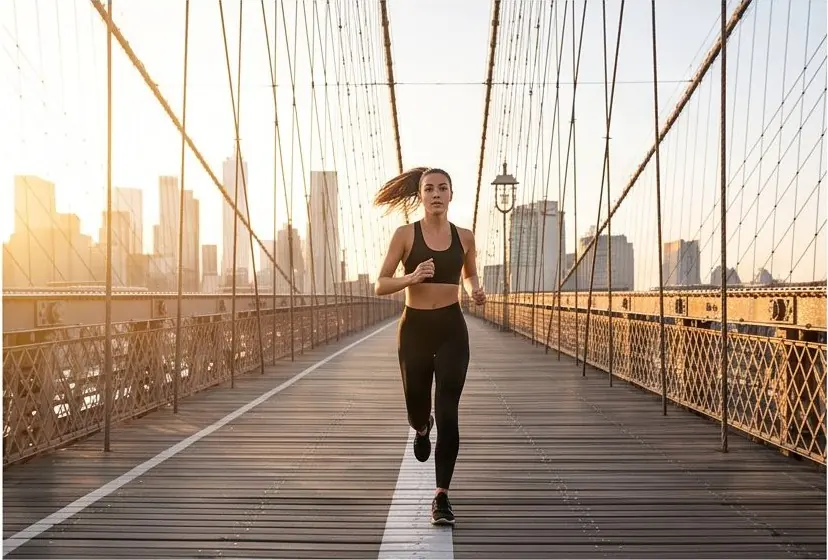
A six-shot sheet from one prompt, and panel 3 animated into video.
 Nano Banana Pro
 Nano Banana Pro
A 15 or 30 second spot, shot by shot, before any money is spent.
The beats of a TikTok skit or a recurring format.
Scenes and transitions mapped to the track.
Frames that sell the idea to a client or a brand.
Previs for scenes, angles and lighting.
A frame per step, ready to animate.
Nano Banana Pro lays out a labelled multi-panel sheet with the same character in every frame.
Crop any panel and use it as the start frame on a video model.
Add a reference image as the first frame on any video model, or up to four reference photos on Nano Banana Pro and GPT Image 2.
Seedance, Kling, Veo, MiniMax, Nano Banana Pro and GPT Image 2 all draw from the same monthly credits as your clips. No stack of subscriptions.
Tap one to drop it into the generator above, then make it yours.
Number the shots and name the character that appears in each.
One image, labelled frames, consistent character.
Use a frame as the start frame of a video.
AI video makes shots cheap, which makes it tempting to skip planning. That is how you end up with forty great clips that do not cut together. A storyboard fixes the order, the angles and the continuity — who is wearing what, where the light comes from — before you generate a single second of video.
Nano Banana Pro can lay out a full storyboard sheet in one image: a grid of cinematic frames with labels underneath and the same character throughout. Ask for the layout explicitly (“a 3-by-2 grid of 16:9 frames with thin white gutters”), number the shots, and describe the character once in detail so every panel matches. The board on this page — a 15-second energy-drink spot, six shots from a 5 a.m. alarm to a product hero — came from a single prompt.
For a recurring character, attach a reference image (up to four on Nano Banana Pro or GPT Image 2) — a character sheet from the AI Influencer generator is ideal. Products work the same way: attach the packshot so it appears correctly in the product frame.
Once the board is right, each panel is a ready-made start frame. Crop it, add it with “+ Add reference” in the video generator, and describe only the motion: “the runner sprints across the bridge at sunrise, tracking shot from the side”. The animated shot above is panel 3 of the board, turned into video with Seedance Fast. Repeat for every panel and the edit almost assembles itself. See image-to-video for the details.
A generated board is also a communication tool. Clients approve frames faster than paragraphs, and an editor or animator can see exactly what each shot should be. Regenerate a single panel when feedback comes in instead of redrawing the sheet, then animate only the approved frames.
Yes. Ask Nano Banana Pro for a multi-panel sheet — for example a 3-by-2 grid of labelled 16:9 frames — and it lays out the board in a single image.
Describe the character in detail once, ask for the same character in every frame, and attach a reference image of the character.
Yes. Crop a panel and use it as the start frame on any video model, then describe the motion.
Nano Banana Pro for photoreal, consistent multi-panel sheets; GPT Image 2 for clean diagram-like layouts.
Nano Banana Pro renders up to 4K, which leaves each panel sharp enough to crop and animate.
Everything runs on one monthly credits wallet that you also use for clipping: Starter is $19 for 300 credits, Pro $39 for 600 and Ultra $59 for 1,000. A storyboard sheet is one image: 6 credits at 1K or 2K, 11 at 4K on Nano Banana Pro. The generator shows the credits before you confirm, and credits reset each billing cycle. See pricing for the full table.
New accounts can start with a $1 3-day trial: 30 minutes of clipping on any plan, watermark-free, plus your own AI Influencer. AI Video, AI Images, Morphaze and AI Ads unlock when your plan starts — or skip the trial in the app to unlock them now.
You do. Our Terms say you keep full ownership of anything you upload or generate, and you are responsible for how you use it — including having the rights to any photo or clip you upload. Platforms increasingly ask you to label realistic AI video; our disclosure guide covers YouTube, TikTok and Meta.
 AI Video Generator
 AI Image Generator
 AI Influencer Generator
 Morphaze AI Character Swap
 AI Motion Transfer
 AI Dance Video Generator
 AI Ad Generator
 AI UGC Video Generator
 AI Product Photo Generator
 Image to Video
 Text to Video
 AI Spokesperson Video
 Faceless Video Generator
 AI Storyboard Generator
Plans from $19 a month for 300 credits, shared across every AI model and your clips. Pro is $39 for 600, Ultra $59 for 1,000. Cancel anytime.
 Seedance 2.5
 Nano Banana Pro
 Kling 3.0
 Veo 3.1
 AI Clip Maker