Fast physical motion
Animals running, splashes, fire, sport.
Kling 3.0 for physical, cinematic motion — galloping, flames, fast camera moves — with optional sound rendered alongside the picture. 3 to 15 seconds, up to 1080p.
Physical motion and camera moves, generated from one sentence each.
Animals running, splashes, fire, sport.
Tracking shots, push-ins and orbits that feel shot on a rig.
Pick a quality with audio and the clip comes with matching sound.
1:1 alongside 9:16 and 16:9 for feed placements.
Start from your JPEG or PNG and let Kling move it.
Pro quality for ads and YouTube.
Seedance, Kling, Veo, MiniMax, Nano Banana Pro and GPT Image 2 all draw from the same monthly credits as your clips. No stack of subscriptions.
Every generation shows its credit cost for the model, length and quality you picked before you confirm it.
Add a reference image as the first frame on any video model, or up to four reference photos on Nano Banana Pro and GPT Image 2.
The same account clips your long videos and streams, so AI shots, hooks and highlights live side by side.
Tap one to drop it into the generator above, then make it yours.
Kling responds best to clear physical action and a named camera move.
720p or 1080p, with or without audio, 3–15 seconds.
Credits shown before you confirm.
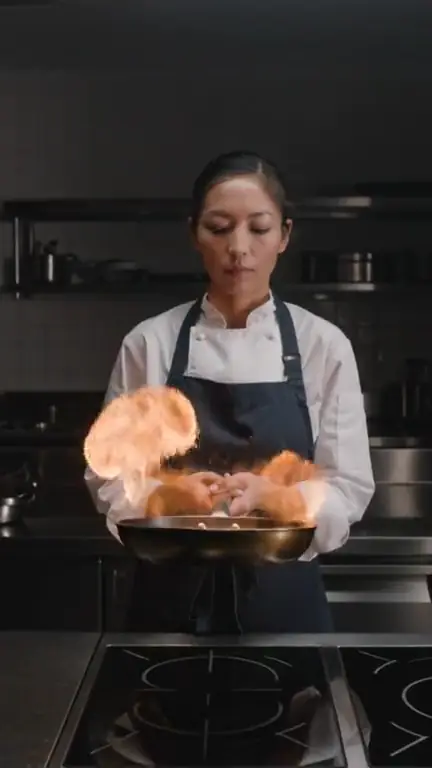
Kling 3.0 is at its best when something in the frame is moving fast and physically: hooves in surf, a burst of flame, a ball through a net, a dog hitting the water. It keeps bodies and objects coherent through quick motion, and it follows named camera moves — a low tracking shot, a slow push-in — closely. Both hero shots on this page are single Kling 3.0 generations from one sentence.
In ClipSpeed, Kling 3.0 renders at 720p or 1080p, and each comes with or without audio. Choose a quality marked “audio” and the clip is generated with matching sound — rain, engines, crowd noise — instead of silence. Clips run from 3 to 15 seconds, in 9:16, 16:9 or 1:1, which makes Kling the one to pick for square feed placements.
Kling 3.0 accepts one start frame through “+ Add reference”, as a JPEG or PNG up to 10 MB. It is a strong choice for animating stills where the motion is physical — a product splash, a car pulling away — because it handles momentum convincingly.
Reach for Seedance 2.5 when you need a long take of up to 30 seconds, Veo 3.1 for photoreal light with native audio in short clips, and Seedance Fast when you want to iterate cheaply. Since every model is on the same credits wallet, running one prompt through Kling and one other model to compare is the fastest way to find the right look. Our Veo vs Seedance vs Kling comparison goes shot by shot.
Lead with the action, then the camera: “a dog leaps off a dock into a lake in slow motion, camera tracking alongside”. Name the speed you want (slow motion, real time) and the lens feel (wide, macro). Keep to one action per clip; for a sequence, generate shots separately and cut them together, or plan them first in a storyboard.
A text-to-video and image-to-video model strong at physical motion and camera moves, available in ClipSpeed’s AI video generator.
Yes. Choose a quality marked “audio” (720p · audio or 1080p · audio) and the clip is generated with sound.
From 3 to 15 seconds.
9:16, 16:9 and 1:1.
Yes. Add one start frame as a JPEG or PNG up to 10 MB.
Everything runs on one monthly credits wallet that you also use for clipping: Starter is $19 for 300 credits, Pro $39 for 600 and Ultra $59 for 1,000. Kling 3.0 at 720p is about 30 credits for 5 seconds and 60 for 10; audio and 1080p cost more. The generator shows the credits before you confirm, and credits reset each billing cycle. See pricing for the full table.
New accounts can start with a $1 3-day trial: 30 minutes of clipping on any plan, watermark-free, plus your own AI Influencer. AI Video, AI Images, Morphaze and AI Ads unlock when your plan starts — or skip the trial in the app to unlock them now.
You do. Our Terms say you keep full ownership of anything you upload or generate, and you are responsible for how you use it — including having the rights to any photo or clip you upload. Platforms increasingly ask you to label realistic AI video; our disclosure guide covers YouTube, TikTok and Meta.
 AI Video Generator
 AI Image Generator
 AI Influencer Generator
 Morphaze AI Character Swap
 AI Motion Transfer
 AI Dance Video Generator
 AI Ad Generator
 AI UGC Video Generator
 AI Product Photo Generator
 Image to Video
 Text to Video
 AI Spokesperson Video
 Faceless Video Generator
 AI Storyboard Generator
Plans from $19 a month for 300 credits, shared across every AI model and your clips. Pro is $39 for 600, Ultra $59 for 1,000. Cancel anytime.
 Seedance 2.5
 Nano Banana Pro
 Kling 3.0
 Veo 3.1
 AI Clip Maker