How to Make an AI Music Video: Shot Lists, Lip Sync and Cutting on the Beat
 ClipSpeedAI
◷ 14 min read
Updated
ClipSpeedAI
◷ 14 min read
Updated
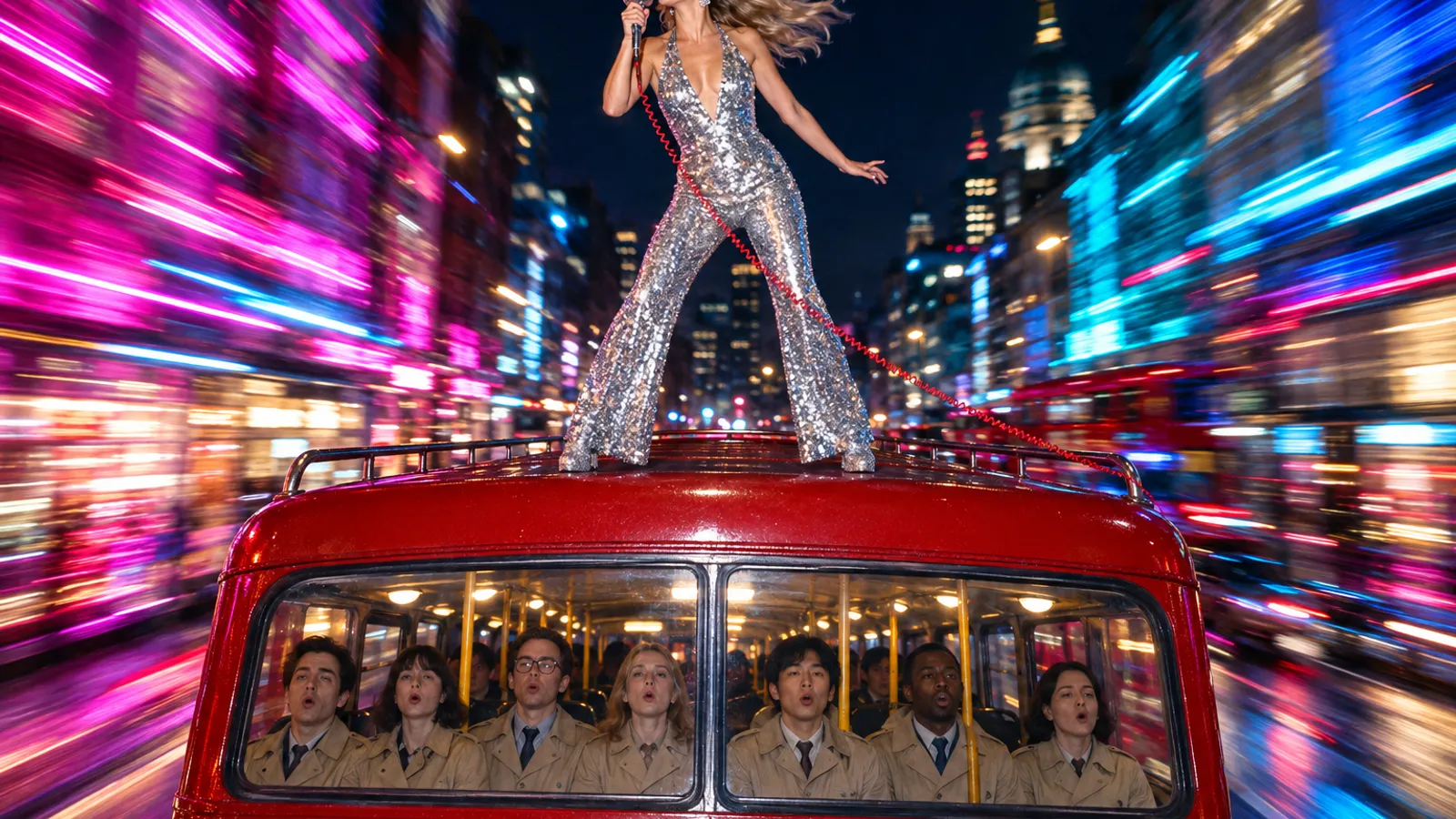
To make an AI music video, start from the finished song and plan backwards. Map its tempo and sections, give each section a job and a shot list, lock the artist's look with reference images, then choose how the singing gets on screen: let a video model sing the lyrics in the shot, drive a still portrait with your real vocal, or re-sync generated footage to the master. Cut every shot on the beat, clear the music and likeness rights, and cut the chorus down for Shorts, TikTok and Reels.
Below: beat math, a shot list by song section, the three lip-sync routes with October 2026 list prices, prompts for one chorus, and the rights and labels that apply. The example song, "Last Stop Kingdom", and its singer, Juno, are invented.
What do you need before you generate the first shot?
A music video is cut to fixed audio, so lock it first. Change the edit after you've paid for shots and you pay again.
- The final master, plus the isolated lead vocal if you can export it; lip-sync tools read the voice.
- The tempo and a section map with start and end times.
- Permission to use the music in a video.
- Artist references: a headshot and a full-body image, plus written consent if the performer is real.
- A release format: a 16:9 master, or vertical-first for Shorts, TikTok and Reels.
Beat math for shot lengths
One beat lasts 60 ÷ BPM seconds, and a 4/4 bar holds four. At 120 BPM that's 2 seconds per bar and 16 seconds for an eight-bar chorus; at 24 fps each beat is exactly 12 frames. Match bars to what each model returns per request: Veo 3.1 makes 4, 6 or 8 seconds, Kling 3.0 3 to 15 and Seedance 2.5 4 to 30. So one Veo clip covers four bars, and one Seedance request can cover a whole chorus. Generate slightly long and trim both ends to a beat.
How do you turn the song's structure into a shot list?
Give each section one job. Lengths assume 120 BPM.
| Section | Typical length | Job | Shots | Lip sync? |
|---|---|---|---|---|
| Intro | 4–8 bars (8–16 s) | Set the world | One wide shot, one slow move | No |
| Verse | 16 bars (32 s) | Introduce the artist and story | B-roll and mediums, held 2–4 bars each | A line or two |
| Pre-chorus | 4–8 bars | Build tension | Shorter cuts, camera pushing in | Optional |
| Chorus | 8 bars (16 s) | Deliver the hook | Performance close-ups and mediums, a cut every 1–2 bars | Yes |
| Bridge | 8 bars | Break the pattern | Different light, slow motion or one long take | Optional |
| Final chorus | 8–16 bars | Pay it off | Widest and closest shots, fastest cuts | Yes |
| Outro | 4–8 bars | Land it | A pull-back, or a callback to the intro | No |
Two habits keep the budget sane. Reuse setups: the chorus comes round two or three times, so generate one set of performance shots with spare takes and cut them differently each time. Spend on the chorus: it's what a cut-down opens on, so it earns the lip-synced close-ups; verses can lean on b-roll.
Releasing the song with a long video?
Performance videos, studio sessions and livestreams are full of moments worth posting. ClipSpeedAI finds the strongest ones, cuts them to vertical 9:16, burns in captions and gives each clip a viral score.
Try ClipSpeedAI →How do you keep the artist the same in every shot?
- Build a reference pack: one headshot and one full-body image, same wardrobe, neutral light.
- Write a lock list for every prompt: hair, wardrobe and one detail nobody could miss, such as a single gold earring.
- Make a start frame for each scene from the same references, so each scene re-anchors the face instead of inheriting drift.
- Use character tools where they exist; Kling's 3.0 guide describes binding a subject's look, and a voice tone, to keep it consistent.
Seedance 2.5 doesn't accept directly uploaded references containing real human faces, and Veo 3.1 allows only adults in image-to-video and reference-image generation. Neither replaces the artist's written permission. More in our guide to consistent AI characters.
Which lip-sync route fits your song?
The three routes differ on the question that matters most: is the voice you hear your actual recording?
| Route | Tool (where checked) | You provide | Length per run | List price | The catch |
|---|---|---|---|---|---|
| The model sings in the shot | Seedance 2.5 (BytePlus) | Prompt with lyrics, optional references | 4–30 s | $0.231/s at 720p | Sings its own vocal, not your master |
| The model sings in the shot | Veo 3.1 (Gemini API) | Prompt with lyrics, optional start frame | 4, 6 or 8 s | $0.40/s Standard, $0.10 Fast, $0.05 Lite (720p) | No audio input at all |
| A still sings your vocal | OmniHuman 1.5 (fal) | One image, the audio, optional prompt | Audio under 60 s at 720p, under 30 s at 1080p | $0.16/s | Little control over camera and staging |
| A still sings your vocal | Kling AI Avatar v2 (fal) | One image, the audio, optional prompt | Not stated on fal's page | $0.115/s Pro, $0.0562/s Standard | Presenter-style framing, not a staged scene |
| Re-sync a clip to your vocal | sync.so sync-3, lipsync-2-pro, lipsync-2 (docs) | Video plus audio | 1 to 30 minutes, by plan | $0.107–$0.133/s, $0.067–$0.083/s, $0.04–$0.05/s | The lipsync-2 models need a face that is already speaking |
| Re-sync a clip to your vocal | Kling LipSync (fal) | Video of 2–10 s, audio of 2–60 s | 10 s of video | $0.014 per video second, billed in 5-second steps | Short clips; 720p or 1080p input only |
Prices and limits read October 8, 2026 on each provider's own pricing page, model page or docs. USD per second, list rates; sync.so's ranges are at 25 fps and vary by plan.
Why native audio isn't lip sync to your track
Seedance 2.5 and Veo 3.1 generate sound with the picture. Put lyrics in the prompt and the character sings them, in a voice and melody the model invents; BytePlus's Seedance 2.5 tutorial includes a rap music video made this way. That suits a concept piece. It breaks when the release is your master: lay the real vocal over the clip and the mouth follows a different melody. Seedance 2.5 does take audio references (up to 10 clips, 30 seconds in total) for music, voice or timbre, but treat them as direction, not a track it will reproduce. More in our native audio guide.
The audio-driven route exists for singing: ByteDance's OmniHuman 1.5 page describes making a digital singer from a single image and a song, with separate tracks routed to each character in group shots.
Native audio needs a re-sync pass for any release using the real recording. Audio-driven portraits limit staging and camera moves to what one image and a short prompt can steer. Re-sync tools change only the mouth, and sync.so says lipsync-2 and lipsync-2-pro need natural speaking motion in the input. Whatever the route, stage sung shots facing the lens, microphone below the chin.
What does 30 seconds of on-screen singing cost?
One attempt at list price, at 720p where the host offers a choice:
| Tool | Rate | 30 seconds | Notes |
|---|---|---|---|
| Seedance 2.5 (BytePlus) | $0.231/s | $6.93 | 16:9, no video input |
| Veo 3.1 Standard / Fast / Lite | $0.40 / $0.10 / $0.05 per s | $12.00 / $3.00 / $1.50 | Four clips: 8 + 8 + 8 + 6 s |
| OmniHuman 1.5 (fal) | $0.16/s | $4.80 | One image plus the vocal |
| Kling AI Avatar v2 Pro / Standard (fal) | $0.115 / $0.0562 per s | $3.45 / $1.69 | One image plus the vocal |
| sync.so sync-3 / lipsync-2-pro | $0.107–$0.133 / $0.067–$0.083 per s | $3.21–$3.99 / $2.01–$2.49 | On top of making the footage |
| Kling LipSync (fal) | $0.014 per video second | $0.42 | Three 10-second runs, plus the footage |
Our arithmetic from the list rates above: one attempt, before taxes, plan fees and retakes.
The real cost is rate times attempts, and lip sync raises attempts because a take can look right and still miss the words. Draft low, judge mouth shapes on the hard consonants, then render finals. See our AI video cost breakdown.
Copy-ready prompts for one chorus
"Last Stop Kingdom" is synth-pop at 120 BPM with a 16-second chorus. Swap in your own lyrics and references.
1. Full-body reference for the artist (any image model)
Full-body studio reference photo of an invented pop singer named Juno, standing straight and facing the camera, arms relaxed at her sides. Woman in her late twenties, tall and slim, warm brown skin, short platinum-blonde finger waves, one small gold hoop in her left ear only. Wardrobe: silver sequined jumpsuit with flared legs, white platform boots, a red coiled microphone cable looped over her right shoulder. Plain mid-grey seamless background, soft even light from the front. Neutral expression, mouth gently closed. Vertical 9:16, sharp focus head to toe, photoreal. No text, no logos, no other props.Run it again as a head-and-shoulders portrait for the headshot. A closed, relaxed mouth gives lip sync a clean starting shape.
2. Chorus performance (Seedance 2.5)
Seedance reads {} as dialogue, () as music and <> as sound effects, so sung lines sit in braces.
Chorus performance for the song "Last Stop Kingdom". 16 seconds, 9:16, four shots with hard cuts on the bar lines at 120 BPM.
Image 1 is Juno's face; Image 2 is Juno's full body and outfit. Use face, hair, earring and wardrobe only; ignore the grey background and studio light. Juno is identical in every shot.
Setting: the open roof of a moving red double-decker bus at night, crossing a wide avenue lined with neon shop signs.
Shot 1 (0-4s): wide from the rear corner of the roof, static. Juno stands centre roof, mic in her right hand, and sings line one.
Shot 2 (4-8s): medium close-up from the front, slow push-in. She leans toward the lens and sings line two, eyes on camera.
Shot 3 (8-12s): low angle from roof level, static. She throws her left arm up on the downbeat as the bus passes under a railway bridge.
Shot 4 (12-16s): close-up, handheld with a slight sway. She sings line three and closes her eyes on the last word.
Wind from the front pushes her hair and the cable backward; the mic never leaves her hand.
Light: magenta and cyan neon from both sides of the street, warm streetlights passing overhead; her face stays lit.
Juno sings in English, lips matching every word: {We ride the night like it owes us a crown} {Last stop kingdom, nobody gets off now} {Hold on tight, hold on tight}. (Synth-pop, 120 BPM, punchy kick on every beat.) <bus brakes hiss> on the final bar. No other voices.
Photoreal music video, 35mm film grain, saturated colour. No subtitles, no on-screen text, no logos.
3. Verse b-roll with no vocals (Veo 3.1)
Eight-second b-roll for a music video verse. Inside the lower deck of a night bus, a rain-streaked window fills the left of frame; neon shop signs slide past outside in long magenta and cyan streaks. A commuter in a beige raincoat rests her head against the glass and taps two fingers on her knee in steady time. Camera locked off at seat height, 35mm look, shallow depth of field, focus on her hand. Cold fluorescent strip light overhead, coloured neon washing across her face from outside. Sound: engine hum, rain on glass, an indicator ticking. No music, no singing, no dialogue.Mute it under the master; ambience only keeps a stray melody out of your ears while you cut. If a Seedance shot adds unwanted music, BytePlus suggests listing every synonym (music, BGM, score, instrumental, melody) at the start and end of the prompt.
4. Your real vocal on a still (OmniHuman 1.5 or Kling AI Avatar)
Image: Juno's headshot, facing the lens, mouth gently closed.
Audio: the isolated lead vocal for the chorus, 16 seconds, no instruments.
Prompt: Juno sings with full commitment, eyebrows lifting on the long notes and a small head nod on every beat. Her hair moves slightly, as if in a light wind. The camera holds a steady medium close-up. Keep her face, earring and jumpsuit unchanged.
How do you cut AI shots on the beat?
- Lock the master on the timeline first. Shots are trimmed to the music, never the reverse.
- Mark the beats with beat detection or a marker on every downbeat.
- Cut on downbeats; change shot size on bar lines. A cut a few frames early reads as an accident.
- Hold sung shots for a full line.
- Check p, b and m. The lips must close on those frames. Slide a late take a frame or two; re-sync a drifting one.
- Mark each chorus with a change of location, light or shot size on its first beat.
For reframing and pacing in vertical edits, see our vertical video editing guide.
What rights and consent do you need?
A commercial song carries two sets of rights, the composition (songwriters and publishers) and the recording (usually a label), and a music video needs both unless the song is yours.
| Situation | What you need | The platform rule that bites |
|---|---|---|
| Your own song | Nothing extra, barring uncleared samples | YouTube requires disclosure of AI-generated music |
| Someone else's song | A sync licence from the publisher and permission from the label | A YouTube Short over a minute with an active Content ID claim is blocked worldwide |
| A song made in Suno | Pro or Premier, which include commercial use rights | Platform AI labels still apply |
| A song made with Lyria 3.5 (Gemini API) | Prompts for specific artist voices or copyrighted lyrics are blocked | Every track carries an inaudible SynthID watermark |
| A real artist on screen | Written consent covering face, voice and where you'll post | TikTok bans AI likenesses of adult private figures used without permission |
| A sound-alike of a famous voice | Don't | YouTube said in 2023 it would let music partners request removal of AI music mimicking an artist's voice |
YouTube lists AI-generated music as something creators must disclose (the "AI use" setting under Attributes in Studio) and says disclosure won't limit audience or eligibility to earn. Instagram names "a song created using AI-generated vocals" as needing its AI label, and TikTok requires a label on AI content with realistic images, audio or video. A commercial-use grant lets you use a track; whether a mostly machine-made song can be copyrighted is a separate question. Not legal advice; see using AI video commercially and whether AI videos can be monetized.
How do you cut it down for Shorts, TikTok and Reels?
Most listeners meet the song in a cut-down, so build it from the hook.
- Open on the chorus or the strongest line; the first second should already be singing.
- Reframe for 9:16. If you generated 16:9, keep the singer's face in the centre third, about all a vertical crop keeps.
- Burn in the lyrics and proofread them: sung words over a full mix are harder to transcribe than speech.
- Watch the clock on YouTube. Shorts can run three minutes, but one over a minute with an active Content ID claim of any type is blocked and can't earn. If the track is in Content ID (your own release can be, once a distributor registers it), keep Shorts to a minute.
- Make several cut-downs, post them over days, and label realistic AI on each platform.
Where does ClipSpeed fit?
For the generated shots, ClipSpeed's AI Creator puts the pieces in one workspace: Nano Banana Pro, GPT Image 2.5 Flare and GPT Image 2.5 Sunburst for reference sheets and start frames, Seedance 2.5 and Veo 3.1 for performance shots where the generated vocal is the point, Kling 3.0 Turbo and MiniMax H3 Max for cheap, fast b-roll, and Gemini Omni 1.1 Flash for editing a take by instruction. ClipSpeed Create, in early access, brings generation into Claude or ChatGPT (how it connects); each generation is quoted first and runs only after the account owner approves it on a signed-in ClipSpeed page.
The cut-down is ClipSpeed's other product, AI clipping: paste the URL of a finished video or livestream and it finds the strongest moments, cuts them to 9:16 or 16:9, burns in captions and gives each clip a viral score. See also clipping music and DJ content.
It won't sync a generated face to your master; the audio-driven and re-sync tools above are separate services. Automatic clip selection may not pick the moment you consider the hook, so review every cut and proofread sung captions.
Which approach fits your project?
- A concept video for an AI-made song → performance shots with the lyrics in the prompt.
- Your real vocal on an invented singer → an audio-driven portrait driven by the vocal stem, intercut with b-roll.
- A staged, moving performance that must match the master → generate the shot, then re-sync it.
- Cheap b-roll in volume → Veo 3.1 Fast or Lite at 720p, muted under the master.
- No song yet → a music model whose terms grant commercial rights.
The bottom line
Lock the song, plan in bars and give every section one job. Decide early whether the voice on screen must be your recording; if so, drive a portrait with the vocal or re-sync the footage. Spend on the chorus, cut on downbeats, check every p, b and m, and clear both sets of rights before anything goes public.
Sources and method
Every limit and price above was read on October 8, 2026 on the provider's own docs, model page or pricing page. Thirty-second costs are list rate times 30 seconds for one attempt. No generations were run for this guide; the song and the singer are invented. Not legal advice.
- Dreamina Seedance 2.5 tutorial and prompt guide (BytePlus ModelArk)
- ModelArk model pricing (BytePlus)
- Generate videos with Veo 3.1 and Gemini Developer API pricing (Google)
- Generate music with Lyria (Google)
- Kling VIDEO 3.0 model user guide (Kling AI)
- OmniHuman 1.5, Kling AI Avatar v2 Pro, Standard and Kling LipSync (fal)
- OmniHuman-1.5 project page (ByteDance)
- Lipsync models and pricing (sync.so)
- Suno pricing
- Understand three-minute YouTube Shorts, Disclosing use of GenAI content and Our approach to responsible AI innovation (YouTube)
- Label AI content on Instagram (Instagram Help Center)
- About AI-generated content (TikTok Support)
Got any questions left?
Can AI make a music video from my own song?
Yes. Drive a singer with your vocal through an audio-driven tool such as OmniHuman 1.5 or Kling AI Avatar, generate b-roll with a video model, and edit everything to the master. Models that sing from a text prompt, such as Seedance 2.5 and Veo 3.1, invent their own vocal, so re-sync those shots to your recording if they must match it.
What is the best AI for lip syncing to a song?
It depends on what you start from. From a still image, OmniHuman 1.5 ($0.16 a second on fal) is built to turn one image and a song into a singer. From existing footage, a re-sync tool such as sync.so's sync-3 re-times the mouth to new audio. Seedance 2.5 and Veo 3.1 sing convincingly, but only a vocal they generate themselves.
How long can an AI music video be?
As long as the song, because you assemble it from shots. Per generation, Veo 3.1 makes up to 8 seconds, Kling 3.0 up to 15 and Seedance 2.5 up to 30, while OmniHuman 1.5 on fal takes audio under 60 seconds at 720p. Plan shots in bars and join them on the beat.
Can I use a famous song in an AI music video?
Only with permission from whoever controls the composition and the recording. Without it, expect Content ID claims; on YouTube, a Short longer than a minute with an active claim is blocked worldwide. See how to avoid copyright strikes.
Can I make an AI music video of a real artist?
Only with their written consent for face and voice. Seedance 2.5 refuses directly uploaded references containing real faces, TikTok bans AI likenesses of private adults used without permission, and YouTube has said music partners can request removal of AI music that mimics an artist's singing voice.
Do I have to label an AI music video?
Usually. YouTube lists AI-generated music as something creators must disclose, using "AI use" under Attributes in Studio. Instagram requires its AI label on a song with AI-generated vocals, and TikTok requires a label on AI content with realistic images, audio or video.
How much does an AI music video cost?
At list rates checked in October 2026, 30 seconds of on-screen singing costs roughly $1.50 to $12.00 per attempt depending on the tool, before retakes and b-roll. Budget for several takes per sung shot, because a take can look right and still miss the words.
Related guides
Published by ClipSpeedAI · AI video generation and AI clipping in one place — create with Seedance, Veo, Kling and Nano Banana, then cut it into captioned shorts.